TRI Through the Ages: From Tariff Publishing to Artificial Intelligence

When we incorporated TRI in 1982, the transportation industry was going through significant changes. The Motor Carrier Act of 1980 had opened the door to deregulation, creating new opportunities for motor carriers and for companies that could help them navigate the changing business environment.

That is where we began—as a tariff publishing service for motor carriers. Looking back more than 40 years later, it was the starting point for a business that would grow right alongside the computer industry.

The technology has changed considerably since those early days. So have the industries we serve. But the work still begins the same way: understanding how a business operates and finding practical ways to help it operate better.

The Early Years: Tariffs, Computers and Carrier Software

Publishing tariffs required an understanding of carrier rates, service territories and the details that went into pricing transportation. It also gave us a close look at the daily challenges motor carriers faced.

We saw opportunities to put computers to work on those challenges. Alongside our tariff publishing services, we began developing software for motor carriers using the database applications available at the time. We also provided network and computer support, built computers and offered hosting services.

In those days, getting a business computerized involved much more than installing a program. The equipment, software and network all had to work together, and people had to be able to use them in their daily work. Our involvement across those areas helped us understand the whole operation.

One development we are particularly proud of was introducing three-digit ZIP code rating systems to our carrier clients. We were the first company in New England to introduce this approach, replacing the cumbersome municipality-to-municipality rating systems used by the Motor Rate Bureaus.

Grouping locations by the first three digits of their ZIP codes made rating more manageable. It was a practical application of technology to a problem we knew well, and it reflected the direction our business was taking.

We continued producing tariffs into the early 1990s. As deregulation progressed and the industry’s needs changed, software development became an increasingly important part of our work.

The 1990s: A Different Way of Computing

Throughout the 1990s, we expanded our computer software and logistics software development. At the same time, the computing industry was changing drastically.

The Apple Macintosh had introduced many people to a graphical way of working with computers in the 1980s. The arrival of Windows 95 brought another major shift. Graphical interfaces, mouse-driven navigation and WYSIWYG—“what you see is what you get”—changed what people expected from their software.

We moved with it.

By the mid-1990s, we were programming graphical interfaces and incorporating those capabilities into our applications. Software could present information more clearly and put more of its functionality within reach of the people using it.

In 1997, we fully transitioned to Microsoft Access front ends supported by Microsoft SQL Server as the back-end database engine. Access provided the screens, forms and reports people worked with, while SQL Server supported the data behind them.

That became an important foundation for our development work and helped pave the way for Internet applications.

We also established www.trif.com in 1997. The name came from TRIF, the Standard Carrier Alpha Code, or SCAC, used in our tariff publishing work. It carried a piece of our transportation history into our Internet presence.

Growing Beyond Motor Carriers

Our experience with motor carriers led naturally to other parts of transportation and logistics.

We expanded our development work to public warehouses, air freight carriers, courier companies, heavy haulers, furniture carriers and moving companies. Each had its own requirements, terminology and ways of doing business.

For moving companies, we developed custom move management systems and integrated them with national household goods carriers such as Allied Van Lines. This meant understanding both the local company’s operation and how it worked with the larger carrier organization.

That kind of work reinforced something we had learned early: businesses in the same industry do not necessarily operate the same way. Custom software needs to account for those differences.

Knowing the technology matters. Knowing what the customer needs to accomplish matters just as much.

The 2000s: More Industries, More Possibilities

In the 2000s, our software development expanded into many other markets.

We built applications for manufacturers, insurance companies and agencies, investment companies, records management companies, aquatic service companies and landscapers. We worked with Internet stores that needed real-time inventory, networking organizations, builders, property brokers and freight forwarders.

Our work also extended to accounting companies, marketing resource enterprises, automobile haulers, tattoo parlors, attorneys, freight audit firms, auto service franchises, security service companies, museums and many nonprofit organizations.

It is quite a range when you put it all together.

Every industry brought something different to the table. A warehouse, an insurance agency, a museum and a landscaping company have different daily concerns. Working across those businesses gave us opportunities to learn, adapt and apply our experience in new ways.

It also broadened our perspective. A useful approach developed for one operation could sometimes help solve a problem in another, provided we understood the differences and adapted it properly.

Through all of that growth, we continued building software around the people who would use it and the work they needed to get done.

More Than 40 Years of Moving with Technology

We have worked through several generations of computing—from early database applications and custom-built computers to graphical interfaces, SQL Server, Internet applications and now artificial intelligence.

Each generation has brought new tools and new possibilities. It has also required us to keep learning.

Today, we are taking advantage of the power of AI. We see opportunities to use it in our development work and to help businesses make better use of their information. As with every technology we have adopted, its value comes from applying it to a useful purpose.

Our years of experience give us a strong foundation for that work. We have seen technologies arrive, mature and change. We have also spent decades learning how businesses operate, where the difficulties arise and what makes a solution useful in practice.

That experience continues to guide us as we explore what AI can do.

Looking Toward the 2030s

When TRI began in 1982, we could not have predicted every change that would follow. We knew there was an opportunity to help motor carriers, and we built from there.

Tariff publishing led to carrier software. Carrier software led to broader logistics systems. Those systems led to applications across many industries. Along the way, we grew with the technology and kept finding new ways to put it to work.

With generations of experience behind us, we are moving toward the 2030s with optimism and excitement about what comes next.

There will be new tools, new challenges and changes we have not yet imagined. We look forward to learning what they can do—and helping our customers put them to work.

We have been growing with technology for more than 40 years. We intend to keep going.

Posted in Uncategorized.

Content Management

Keeping Information Organized, Accessible and Useful

Businesses produce a considerable amount of information. Documents, spreadsheets, photographs, forms, videos, emails and website content all become part of the daily operation. As that information grows, so does the challenge of keeping it organized.

Most of us have experienced the alternatives: searching through email attachments, opening several versions of the same spreadsheet or asking someone where the latest document was saved. A file named “Final-Version-Updated-Final” might sound familiar.

Content management brings some order to that process. It combines the procedures and technology used to collect, create, organize, review, share, publish and eventually archive or remove information.

The goal is straightforward: help people find the information they need, know whether it is current and use it appropriately.

What Is a Content Management System?

A Content Management System, commonly called a CMS, provides tools for managing content throughout its useful life.

For a website or blog, that might mean writing an article, adding photographs, reviewing a draft and publishing it without having to program a web page. Within a business, it might mean managing procedures, project documents, customer information or an internal knowledge library.

The terminology can overlap, but there are some useful distinctions:

  • Web content management focuses on creating and publishing website pages, blog posts and other online content.
  • Document management focuses on business documents, including their storage, versions, review and access.
  • Digital asset management, or DAM, focuses on reusable assets such as photographs, graphics, audio and video, often including information about ownership and permitted use.
  • Enterprise content management takes a broader view of information across an organization, including documents, workflows and records.

A business may use several of these capabilities together. A marketing department, for example, might keep approved photographs in a digital asset management system and use those photographs in articles published through its website CMS.

What Kind of Content Can Be Managed?

Content goes well beyond written documents. Depending on the system, it may include:

  • Documents: PDF files, Microsoft Word files such as .docx, plain text and older .doc files.
  • Spreadsheets: Microsoft Excel files such as .xlsx and .xls, along with CSV files and other data exports.
  • Images: JPEG, PNG, TIFF, WebP, SVG and other photographic or graphic formats.
  • Presentations: PowerPoint files such as .pptx, PDFs and related presentation materials.
  • Video and audio: MP4, MOV, MP3, WAV, recordings, podcasts and training materials.
  • Business forms and records: Applications, contracts, invoices, scanned paperwork and completed forms.
  • Online content: Website pages, articles, product descriptions, FAQs and internal reference materials.

A system’s ability to store a file does not necessarily mean it can display, search or edit everything inside it. Those capabilities depend on the software, its configuration and any connected applications.

That distinction becomes important when choosing a system. Keeping scanned documents in a folder is useful. Being able to search the words within those documents is considerably more useful.

Organization Is More Than a Folder Structure

Folders help, but content management can provide additional ways to identify and retrieve information.

A document might be associated with a customer, project, department, author, date or approval status. A photograph might include a description, subject, copyright owner and permitted uses. These details are commonly called metadata—information about the content.

In practical terms, metadata gives people more ways to find what they need.

Someone might not remember a filename but may know the customer’s name, the project number or approximately when the document was created. A properly organized system can make those details searchable.

Consistent naming, useful categories and clear ownership still matter. Software provides the tools; people establish the habits that make those tools effective.

Collaboration and Access

Content management can support both formal publishing and everyday teamwork.

In a corporation or educational organization, information may follow an approval process. One person writes a document, another reviews it and an authorized person publishes it. Employees or students then receive access to the approved version.

In a project team, several people may contribute directly, review one another’s work and edit shared documents.

Many organizations use a combination of these approaches. A team may collaborate freely while preparing a document, then require approval before distributing it more widely.

Access rights determine who can view, contribute, edit, approve or publish content. Collaboration does not require everyone to have the same permissions. It requires people to have the access they need to do their work.

Versions, Approvals and Accountability

One of the most useful capabilities in content management is keeping track of changes.

Version history can help people see how a document developed and recover an earlier version when necessary. Approval workflows can distinguish a working draft from material that is ready for use. Activity records can help establish who changed, approved or shared information.

For example, SharePoint supports version history for documents and other content, with behavior governed by its settings. Microsoft’s version history overview

These capabilities help answer familiar questions:

  • Is this the current version?
  • Who made the last change?
  • Has it been approved?
  • Can we recover the previous version?
  • Who has access to it?

The availability and detail of these features vary by platform. They need to be configured to match the organization’s requirements.

Working Across Locations

Web-based and cloud-hosted systems allow authorized users to work with shared content from different locations. Employees, customers and project partners may be able to access the same information through a browser or connected application.

That can reduce the need to send documents back and forth as email attachments. Instead, people can work from a shared location where updates are easier to track.

Access still depends on permissions, connectivity and the capabilities of the system. Some applications also support offline work and synchronize changes when a connection becomes available.

For businesses with several offices, remote employees or people working in the field, this flexibility can make content management part of the daily workflow.

Different Tools for Different Purposes

The products often grouped under “content management” do not all serve the same purpose.

WordPress, Drupal and Joomla are examples of platforms used to manage website content. WordPress, which supports this blog, provides tools for creating and publishing pages and posts. About WordPress

Microsoft SharePoint supports internal sites, shared document libraries and collaboration within organizations.

OpenText offers enterprise content management products for managing business information and related processes. Its current offerings also include AI capabilities. OpenText content management

Digital asset management platforms, such as Adobe Experience Manager Assets, emphasize organizing and distributing reusable media. They can connect with web publishing and other business systems. Adobe’s digital asset management guide

The appropriate choice depends on the work involved. Publishing a blog, managing internal procedures and maintaining a large library of licensed photographs call for different capabilities.

Where AI Fits In

AI is becoming another tool in content management. Depending on the platform, it can assist with tasks such as classifying documents, suggesting tags, extracting information, summarizing material and helping users locate relevant content.

OpenText, for example, describes AI capabilities that support content workflows and the use of information from connected business applications. OpenText’s overview of AI-driven content management

These developments offer useful possibilities. They also make the quality of the underlying information more important.

An AI-generated answer based on an outdated procedure is still based on an outdated procedure. Clear ownership, current documents and appropriate access remain essential. AI-assisted results also need review appropriate to their use.

Good content management gives these new tools a better foundation to work from.

Making Content Management Work

A successful system begins with understanding how information moves through the business.

Who creates it? Who needs it? Who approves it? How long should it remain available? What happens when it becomes outdated?

Those questions help establish a workable process before the software is configured.

A small organization may need little more than a well-managed website and shared document library. A larger operation may need several connected systems, approval workflows and formal records management.

Either way, the value comes from making information easier to find, trust and use.

Content management has grown considerably from the days of storing files and publishing pages. It now supports much of the way organizations communicate and collaborate. But its purpose remains practical: spend less time hunting for information and more time putting it to work.

Posted in Uncategorized.

A Year of Photographs

I have written a book, sort of… It is a published version of my photo blog from 2015. You can review it here, or if you like, you can purchase the pdf version and if money is no object, feel free to purchase the printed book. Have a peek here: https://www.blurb.com/books/12700614-a-year-in-pictures.

I had a web site containing my photos for years, you can look, it may still be up, www.robertmckayjones.net. but wanted to create something a bit more lasting. This book is my answer to the Internet. I enjoyed the process, taking photos every day, going through sometimes hundreds of pictures in a day to find the one  image that spoke to me and trying to come up with the words why. I

enjoyed editing the photos, sometimes changing them completely or making something out of nothing (see March 6). I especially revered taking a picture so memorable and moving that looking at it again takes me back to that moment in time instantly (see July 23). I also found it impossible on some days to find the will or the optimism or the passion to see a shot  (see February 23) that I took a very mundane scene and added hope for my own sanity. Winters in New England often drove m ee over that edge.  And then there were the pictures of things I loved, like my fiat (see August 7).

All in all, I took more than 40,000 photos that year and selected under 370 of them for this book. I spent hundreds of man-hours traveling, shooting, editing and writing.  It made be a better photographer because it made me see things I would not have seen. It made me appreciate the little things more than ever. My granddaughter jumping in the air just because she could, It’s a memory I will always have and will always treasure. My grandson, passing me a loving scowl. I will cherish it always. In the end, it may be my own elixir and for my own sanity, but I just like any creator hope you behold the beauty of my efforts.

If you get nothing from this book, I pray you get these three things.

Appreciate. No matter your age or your condition, learn to appreciate the moments in your life because it is those moments when woven together that become your life! When you get to the gates, whatever gates those are at the end of your life, it is all those moments that will pour through your mind like a wondrous river of color and smell and sound. It will be your symphony!

Create. Learn to be creative. Write, paint, shape, draw, carve, turn, shoot, talk, teach, stuff, bake, travel, speak, share, whatever makes you happy, create something. Everyone needs to create something. It doesn’t need to be great. It doesn’t even need to be good. It needs to be yours!

See. Catch the detail, the nuance, the nature, the beauty, the edge, the color, and the ugliness. Observe the perfection or the imperfection. Things are not as you see them until you look long and hard. Magnify them in your mind. Be inquisitive. Ask yourself, why is it like this? How did this become like this? Answer the question, “I wouldn’t have noticed this if I hadn’t…”

Posted in Uncategorized.

Using AI to Support Value Base Pricing

Value-based pricing has been a business concept for a long time. It provides substantiation for improved pricing models for products and services, but it is rarely used in small businesses. Why?  Because it requires quantitative analysis of the beneficial success provided by a product or service and the measurable impact of that success. That is, what good is the product or service to the customer?

Let’s ask AI how it might help:

AI can significantly enhance the development and implementation of a value-based pricing model through several methods1:

  1. Data Analysis: AI can analyze large volumes of data to identify patterns and insights about customer behavior, preferences, and willingness to pay. This includes analyzing historical sales data, customer feedback, and market trends.
  2. Customer Segmentation: AI algorithms can segment customers based on various attributes such as purchasing behavior, demographic information, and engagement levels. This segmentation allows for more precise targeting and pricing strategies tailored to different customer groups.
  3. Predictive Analytics: AI can predict future trends and customer responses to different pricing strategies. By using machine learning models, businesses can forecast demand, optimize pricing in real-time, and adjust prices based on predicted customer behavior.
  4. Competitive Analysis: AI tools can continuously monitor competitors’ pricing strategies and market conditions. This helps businesses to adjust their pricing dynamically to stay competitive and capture more value.
  5. Price Optimization: AI can simulate different pricing scenarios and recommend the optimal pricing strategy that maximizes revenue and profit. This involves evaluating factors such as cost, perceived value, competitor prices, and customer demand elasticity.
  6. Personalized Pricing: AI enables personalized pricing strategies by analyzing individual customer data and behavior. Businesses can offer personalized discounts, promotions, or pricing tiers aligning with customers’ perceived value.
  7. Sentiment Analysis: AI can analyze customer reviews, social media posts, and other textual data to gauge customer sentiment towards pricing. This helps understand how customers perceive the value of products or services and adjust prices accordingly.
  8. Dynamic Pricing: AI can implement dynamic pricing strategies where prices are adjusted in real-time based on market demand, inventory levels, and other factors. This ensures that prices reflect the current market conditions and customer willingness to pay.
  9. A/B Testing: AI can automate A/B testing of different pricing models and analyze the results to determine which model performs best. This iterative process helps in refining the pricing strategy based on empirical evidence.
  10. Customer Lifetime Value (CLV) Analysis: AI can calculate the CLV for different customer segments and align pricing strategies to maximize long-term profitability rather than focusing solely on short-term gains.

But before we look at how AI might help us create value-based pricing, let’s review why we would want to establish value-based pricing. Again, let’s ask AI2:

  1. Enhanced Profit Margins: By pricing products or services based on the value perceived by customers, businesses can often charge higher prices than cost-based or competition-based pricing models, leading to higher profit margins.
  2. Customer Satisfaction and Loyalty: When prices align with the value customers perceive, they are more likely to feel satisfied with their purchase, which can lead to increased customer loyalty and repeat business.
  3. Competitive Differentiation: Value-based pricing can differentiate a company’s offerings from competitors. By focusing on unique value propositions and customer benefits, businesses can stand out in the market and attract customers who appreciate the added value.
  4. Better Understanding of Customer Needs: Developing a value-based pricing model requires a deep understanding of what customers value most. This process can provide valuable insights into customer needs and preferences, which can inform product development and marketing strategies.
  5. Increased Revenue: By capturing the maximum amount that customers are willing to pay, businesses can increase their overall revenue. This approach can also help in maximizing the lifetime value of each customer.
  6. Flexibility and Adaptability: Value-based pricing allows for more flexible pricing strategies that can adapt to changes in customer perceptions, market conditions, and competitive dynamics. This adaptability helps businesses stay relevant and competitive.
  7. Focus on Quality and Innovation: Companies that adopt value-based pricing are often encouraged to focus on improving the quality and innovation of their products or services. This continuous improvement can lead to a stronger market position and long-term success.

Now that we can see the advantages of value-based pricing, how might we apply the principles AI provides us for establishing a new pricing model in our own business?

Let’s look at my business, a software development company specializing in web-based data-driven applications. Again, let’s ask AI what we might do to establish a value-based pricing model1:

Establishing value-based pricing in a software development business involves several steps to understand and quantify the value your services provide to clients. Here’s a structured approach:

1. Understand Customer Needs and Value Perception

Identify Customer Segments:

  • Segment your customers based on industry, size, type of software needed, and other relevant factors.
  • Understand the specific needs and pain points of each segment.

Conduct Market Research:

  • Gather data on what customers value most in software development services (e.g., speed, customization, reliability, post-launch support).
  • Use surveys, interviews, and feedback forms to collect insights from existing and potential clients.

2. Define the Value Proposition

Articulate Benefits:

  • Clearly define the benefits and outcomes your software solutions deliver (e.g., increased efficiency, cost savings, improved customer experience).
  • Quantify the value where possible (e.g., “Our software can reduce operational costs by 20%”).

Highlight Differentiators:

  • Identify what sets your software development services apart from competitors (e.g., unique features, proprietary technology, superior customer service).

3. Measure Value Delivered

Use Case Studies and Testimonials:

  • Develop case studies that demonstrate the value your software has delivered to clients.
  • Collect testimonials that highlight specific benefits and outcomes.

ROI Calculations:

  • Calculate the return on investment (ROI) your software provides to clients. For example, if your software saves a client $100,000 annually and costs $20,000, the ROI is 5x.

4. Set Pricing Based on Value

Determine Willingness to Pay:

  • Conduct surveys or interviews to understand how much clients are willing to pay for the value your software delivers.
  • Use conjoint analysis or other pricing research methods to gauge price sensitivity and willingness to pay.

Create Pricing Tiers:

  • Develop tiered pricing models that align with different levels of value delivered. For example, basic, standard, and premium packages with varying features and service levels.

5. Implement and Communicate Pricing

Transparent Communication:

  • Clearly communicate the value and benefits of your services to clients.
  • Use value-based language in proposals and marketing materials (e.g., “Our software reduces downtime by 30%, increasing your productivity”).

Train Sales Team:

  • Ensure your sales team understands the value-based pricing approach and can effectively communicate the value proposition to clients.
  • Equip them with tools and resources to demonstrate ROI and value.

6. Monitor and Adjust

Track Performance:

  • Regularly monitor the performance of your pricing strategy through key metrics such as conversion rates, customer satisfaction, and retention.
  • Gather feedback from clients to understand their perception of value and pricing.

Adjust as Needed:

  • Be prepared to adjust your pricing strategy based on market changes, competitor actions, and evolving customer needs.
  • Continuously refine your value proposition and pricing based on feedback and performance data.

By focusing on the value your software development services deliver, you can establish pricing that reflects the benefits clients receive, leading to higher satisfaction and better business outcomes.

The key to value-based pricing is and will always be understanding the value your product or service provides. Establishing that value is grueling and time-consuming but it can provide long-term benefits. Don’t be dissuaded from the arduous task of determining value-based pricing. Seek out a firm that is willing to assist in the market research and analysis and the value proposition and strategy. The cost of this service might very well be offset by the increase in revenue.

1 ChatGPT (a free AI web application; chatgpt.com) provided the italicized response and it was edited with Grammarly (a free AI add-on for writers; grammarly.com).

Posted in Uncategorized.

Microsoft OneNote

Still a Quiet Little Powerhouse

When I first wrote about Microsoft OneNote, I wondered how I had managed to overlook reviewing it. Shame on me! It was already a quiet little powerhouse of an application, and it still deserves more attention than it gets.

Think of it as a digital file cabinet, a collection of notebooks and a place to put all those things you are certain you will need again—if only you can remember where you put them.

If you use Microsoft 365, formerly Office 365, OneNote may already be at your fingertips. It is also available as a free application, although some advanced capabilities require an eligible subscription.

A File Cabinet That Travels with You

The basic organization is easy to understand. You create notebooks, divide them into sections and fill those sections with pages. Subpages let you group related notes, while section groups help organize larger collections.

You might have one notebook for business, another for personal projects and another for whatever currently has your attention. Within a business notebook, you could create sections for customers, meetings, research, procedures and ideas.

Unlike a paper file cabinet, a cloud-connected notebook can travel with you. Notebooks stored in OneDrive or SharePoint can synchronize across supported devices, allowing you to work at your office computer and pick up your notes later on a laptop, Mac, iPad, iPhone or Android device. There is also a browser version. Microsoft’s notebook synchronization guide

The features differ somewhat between versions, but the convenience is considerable. The information you collected at your desk can be available when you need it elsewhere.

More Than Typed Notes

A OneNote page is a flexible workspace. You can type notes, paste information, add pictures, arrange items around the page and, on supported devices, write or draw with a pen.

A project page might contain meeting notes, a screenshot, a website link, a PDF printout and an attached spreadsheet. Another might hold travel plans, photographs, receipts or the beginnings of your next blog article.

Depending on the version, you can also record audio or include other media. Documents can be attached as files, while supported printouts let you view and annotate their contents directly on the page.

There is an important difference between those two approaches. An attachment gives you a file to open. A printout gives you a visible representation to mark up. Choose whichever suits the work.

You do not have to make every page look like a finished report. Sometimes you simply need a place to collect the pieces before you know what you intend to do with them.

OneNote is very good at that.

Finding What You Put Away

Of course, collecting information is only half the job. Finding it again is where a notebook earns its keep.

OneNote can search typed notes and, in supported versions, recognize text in images and handwriting. Recognition is not perfect, but it can help locate information that would otherwise require considerable browsing. Microsoft’s guide to searching OneNote

Tags provide another way to organize your thoughts. You can identify an item as a task, an important point or a question that needs an answer.

A little structure helps. Meaningful page titles and a few sensible sections can save a great deal of hunting later. You do not need to design an elaborate filing system before beginning, but throwing everything into one enormous page will eventually test your patience.

Collecting Information from Other Sources

OneNote remains a useful place to bring together information from documents, emails, websites and paper records.

You can paste material directly, insert files and images, or use supported sharing and clipping tools. Microsoft’s OneNote Web Clipper is designed to save all or part of a web page to a notebook. OneNote Web Clipper

Some of the tools mentioned in my original review have changed or disappeared. Office Lens, later called Microsoft Lens, has been retired. Microsoft now directs users to OneDrive’s scanning capability as an alternative. Scanned files can then be brought into your notes as needed. Microsoft Lens retirement notice

Third-party connections also change over time. Before depending on a particular scanner, smartpen or application integration, check whether it still supports your current setup.

The useful idea remains the same: bring related information together so you can work with it in one place.

Sharing a Notebook

OneNote can also serve as a shared workspace.

A notebook might contain project notes, operating procedures, research or information that employees and collaborators need to reference. Authorized contributors can make changes, and those changes synchronize through the shared notebook.

Page history and recovery capabilities can help when something needs to be reviewed or restored, although the available controls vary by version.

Be thoughtful about how you organize shared material. Notebook sharing generally gives access to the notebook, so separate notebooks are useful when different groups need access to different information.

A shared project notebook can reduce the familiar exchange of “Did you get my notes?” and “Which copy are we using?”

OneNote and Outlook

The connection with Outlook remains useful, particularly for keeping correspondence and meeting information alongside your notes.

Supported Outlook versions provide a Send to OneNote feature for transferring emails and meeting invitations into a notebook. That lets you keep the original context close to the notes, questions and follow-up items it generated. Microsoft’s Outlook-to-OneNote guide

The exact options depend on your Outlook version, OneNote version and account. Classic Outlook, new Outlook, the web and Mac applications do not all behave identically. I would no longer describe the connection as universal two-way synchronization.

Still, the practical benefit is easy to appreciate. A meeting becomes more useful when its agenda, supporting information, notes and decisions can be found together.

You can then distribute the results through a shared notebook link or a copy of the notes, depending on what your application supports and what the recipients need.

Now There Is AI, Too

OneNote has also gained Microsoft Copilot capabilities.

With an eligible subscription or license, Copilot can help summarize notes, rewrite material, develop lists and identify action items. Availability depends on the account and platform. Microsoft’s introduction to Copilot in OneNote

That offers some interesting possibilities. A collection of rough meeting notes can become a starting point for a clearer summary or a plan of action.

You still need to review the result. AI can help organize what you captured, but you should check that it accurately reflects the discussion—particularly before sending it to someone else.

Even without Copilot, OneNote remains a capable application. Its usefulness begins with having your information organized and available.

A Note About the Windows Version

If you have an older installation, check which application you are using.

The separate application named OneNote for Windows 10 reached the end of support on October 14, 2025, and is transitioning to read-only use. Microsoft directs users to the current Windows application, named simply OneNote, to continue editing and synchronizing their notes. Microsoft’s explanation of the change

The similar names have caused understandable confusion. It is worth checking before you wonder why an old installation is no longer behaving as expected.

My Take

Microsoft OneNote is one of those applications that can quietly improve the way you work. It gives you a flexible place to capture ideas, collect reference material, organize projects and collaborate with others.

It also leaves room for the way people actually think. Some days you are methodical. Other days you have a picture, three links, a half-finished thought and a note to yourself. They can all go on the page.

Like many powerful tools, most people probably use only a fraction of its capabilities. Even that fraction can make a meaningful difference.

If you have not explored OneNote lately, give it another look. Start with one notebook and something you would like to keep organized.

Sometimes the most useful technology is already sitting on your computer, waiting to be discovered.

Posted in Uncategorized.

Bitcoin and Blockchain

Understanding the Technology Behind the Hype

OK, get ready for your brain to start hurting.

When I originally wrote this article, cryptocurrency was introducing an interesting possibility: could people exchange money without relying on a bank to verify and record every transaction?

That question still deserves attention. The suggestion that financial institutions would soon become unnecessary, however, deserves considerably more skepticism.

Let me make my position clear at the outset. I am not a promoter of cryptocurrency, and this article is not a recommendation to buy it. My interest is in understanding the technology, what it accomplishes and where its limitations begin.

After years of developing business software and working with databases, I find the recordkeeping behind Bitcoin particularly interesting. The investment enthusiasm surrounding it is another matter.

So What Is Cryptocurrency?

A cryptocurrency is a digital asset that uses cryptographic techniques to authorize transactions and support the rules of its network.

Bitcoin, which began operating in 2009, was designed to allow electronic payments between participants without requiring a financial institution to act as the intermediary. Its original design was described by someone using the name Satoshi Nakamoto. The original Bitcoin paper

Since then, many other cryptocurrencies have appeared. They do not all work the same way, serve the same purpose or offer the same degree of decentralization.

For this discussion, we will concentrate on Bitcoin. It is complicated enough without inviting every other cryptocurrency into the room.

Start with the Ledger

At the center of Bitcoin is a shared transaction record called a blockchain.

A ledger records transactions. A blockchain organizes those transactions into groups called blocks and links each block cryptographically to the one before it.

Bitcoin’s network uses rules to determine which transactions and blocks are valid. Full nodes independently check those rules. You do not have to operate a full node simply to use a wallet, and every phone or computer using Bitcoin does not carry a complete copy of its history.

One important problem this system addresses is double spending: preventing someone from spending the same digital funds more than once. Bitcoin’s blockchain documentation

So Bitcoin involves a ledger, but it is more than a ledger. It also includes the network, software, transaction rules and digital asset recorded within that system.

That Sounds Familiar

In our inventory control database software, we have long maintained transaction histories that let us reconstruct on-hand balances at earlier points in time.

What came in? What went out? When did it happen? How did we arrive at the balance we see today?

That history is valuable when researching discrepancies, answering customer questions or reviewing an operation.

The similarity to blockchain is the importance of a reliable transaction record. The difference is how that record is controlled.

A conventional business database normally has an organization responsible for administering it. Bitcoin is designed to let participants check a shared record without depending on one central database administrator.

That is an interesting engineering problem. It does not mean that every inventory system, accounting application or business database needs a blockchain.

For many business applications, a conventional database with appropriate permissions, transaction controls and backups remains a practical approach.

How Does Mining Work?

Bitcoin uses a process called proof of work.

Miners assemble candidate blocks of transactions and compete to produce a result that meets the network’s difficulty requirement. Other network participants validate the resulting block before accepting it.

The successful miner can receive newly created bitcoin, called the block subsidy, along with transaction fees.

Bitcoin targets an average interval of approximately ten minutes between blocks. That is an average, not a schedule or a guarantee that a payment will finish in ten minutes. Mining difficulty adjusts every 2,016 blocks to help maintain that pace. Bitcoin’s mining documentation

My original article referred to a subsidy of 25 bitcoin per block. That figure is now well out of date.

Following the April 2024 halving, the subsidy became 3.125 bitcoin per block. Under the existing rules, it halves every 210,000 blocks, approximately every four years. The next reduction is expected around 2028. Bitcoin’s issuance schedule

Mining has also moved well beyond the idea of downloading software and putting an ordinary office computer to work. Competitive Bitcoin mining generally involves specialized equipment, substantial electricity use, cooling and careful attention to operating costs.

Does This Eliminate the Need for Trust?

It changes where trust is placed.

Bitcoin allows participants to verify transactions through software and shared rules, reducing dependence on a central institution for that particular function.

But people still make decisions about wallets, exchanges, custody services and the security of their devices. If a company holds cryptocurrency on your behalf, you are depending on that company to handle it properly.

If you hold it yourself, responsibility for protecting the credentials that control it falls much more directly on you.

And a valid transaction says nothing about whether the person receiving your payment will deliver what was promised. The network can verify a transfer; it cannot inspect the merchandise or settle every dispute.

“Trustless” is a term frequently used in cryptocurrency discussions. I think it needs that explanation attached.

Is Bitcoin Anonymous?

My original article gave too much weight to the idea that Bitcoin could be as private as someone wanted it to be.

Bitcoin is generally described as pseudonymous, rather than anonymous. Its public transaction record uses addresses instead of displaying names, but addresses and transaction patterns can sometimes be connected to people or organizations.

Once that connection is established, the public history may reveal considerably more than someone expected. Bitcoin’s own privacy guidance emphasizes the visibility and traceability of transactions. Bitcoin privacy guidance

A public ledger is a feature worth understanding before treating it as a private payment system.

Secure Recordkeeping Does Not Guarantee a Safe Purchase

Another distinction matters: the security of a transaction system and the value of an asset are separate questions.

A network can record a transaction correctly while the asset changes dramatically in price. It can also record a payment to a scammer just as correctly as a payment to a legitimate business.

Cryptocurrency payments typically lack the reversal options people associate with credit cards. A refund generally depends on the recipient returning the money. The FTC also warns about fraudulent investment offers and demands for cryptocurrency payments. FTC guidance on cryptocurrency and scams

Technical sophistication does not remove ordinary business risk or make an investment profitable.

What Happened to the Merchant List?

My original article included a long list of businesses reportedly accepting Bitcoin.

I have removed it because those lists age quickly. They can also mix together very different arrangements: direct payments, third-party processing, gift cards and limited experiments.

Buying a gift card with cryptocurrency and then using that card at a store does not necessarily mean the store accepts cryptocurrency itself.

If a business offers a cryptocurrency payment option, the useful questions concern the actual transaction: what currency is being charged, what fees apply, how conversion works and how refunds are handled.

A collection of familiar company names does not answer those questions.

Have Financial Institutions Become Unnecessary?

The story has become more complicated than that early prediction suggested.

In January 2024, the U.S. Securities and Exchange Commission approved the listing and trading of several spot Bitcoin exchange-traded products. Its statement explicitly distinguished that approval from endorsing Bitcoin. SEC statement on spot Bitcoin products

To my mind, that development illustrates how cryptocurrency and traditional financial institutions can become intertwined. An asset designed for direct transfers can also become something people access through brokers, funds and custodians.

Banks also perform functions beyond recording payments, including lending and providing account services. A blockchain does not automatically replace all of those activities.

The more useful question is which financial functions this technology can perform effectively, at what cost and with what tradeoffs.

Why I Still Find It Interesting

My interest remains in the underlying problem: how do participants who do not know one another agree on a transaction history without giving one organization complete control?

Bitcoin presents a working approach to that problem. Understanding it helps explain why blockchain attracted attention in the first place.

Whether a particular business needs that approach is a separate decision. Sometimes distributing control is valuable. Sometimes it adds complexity to a problem that an ordinary database already handles well.

And whether someone should buy cryptocurrency is another question entirely.

I am comfortable being curious about the technology without becoming its promoter. There is plenty here to study, question and discuss.

If your brain hurts a little now, mine does too. At least we have a clearer idea of what we are looking at.

Posted in Uncategorized.

A Picture is Worth a Thousand Words

This is unusual.  I am not one to voice any political ideals; be they right, center or left.  I haven’t the time to stay current on all aspects of foreign and domestic issues.  I do watch more closely since the debacle (farce, disaster, calamity, tragedy) of 2008. I am dumbfounded by the way our political system works – or doesn’t work. I took this photo because it said something to me.  Can you see it?  I have always loved America, its origins, the makeup of its people and most of all, the possibilities. I would like to say that I have always been proud.  I can’t.  The pride is clouded DSC2097by the incredible success greed (gluttony, avarice, insatiability) seems to have had in our economy and sadly in all our lives. Whether it is Monsanto, JPMorgan Chase, Citigroup, AIG,  Novartis, Exxon Mobil, or BP, we have a major problem with influence.  I am so tired of the rhetoric, so tired of politicians, lobbyists, democrats and republicans.

We have such potential as a nation. I don’t know what the solution is.  I do know it will take a group of incredibly honest (sincere, decent, law-abiding, moral, truthful) and remarkable (intelligent, clever, experienced, intellectual, gifted, shrewd, rational) leaders to effect change.

I sit in wonderment staring at this picture and ponder a better America.

Happy Holidays everyone!  May 2015 be the year of such new leaders.

Posted in Uncategorized.

Tracking Weight Loss – On and Off

This article really has nothing to do with weight loss.  It is an article about business intelligence.  But there is a direct relationship.  Stay with me.

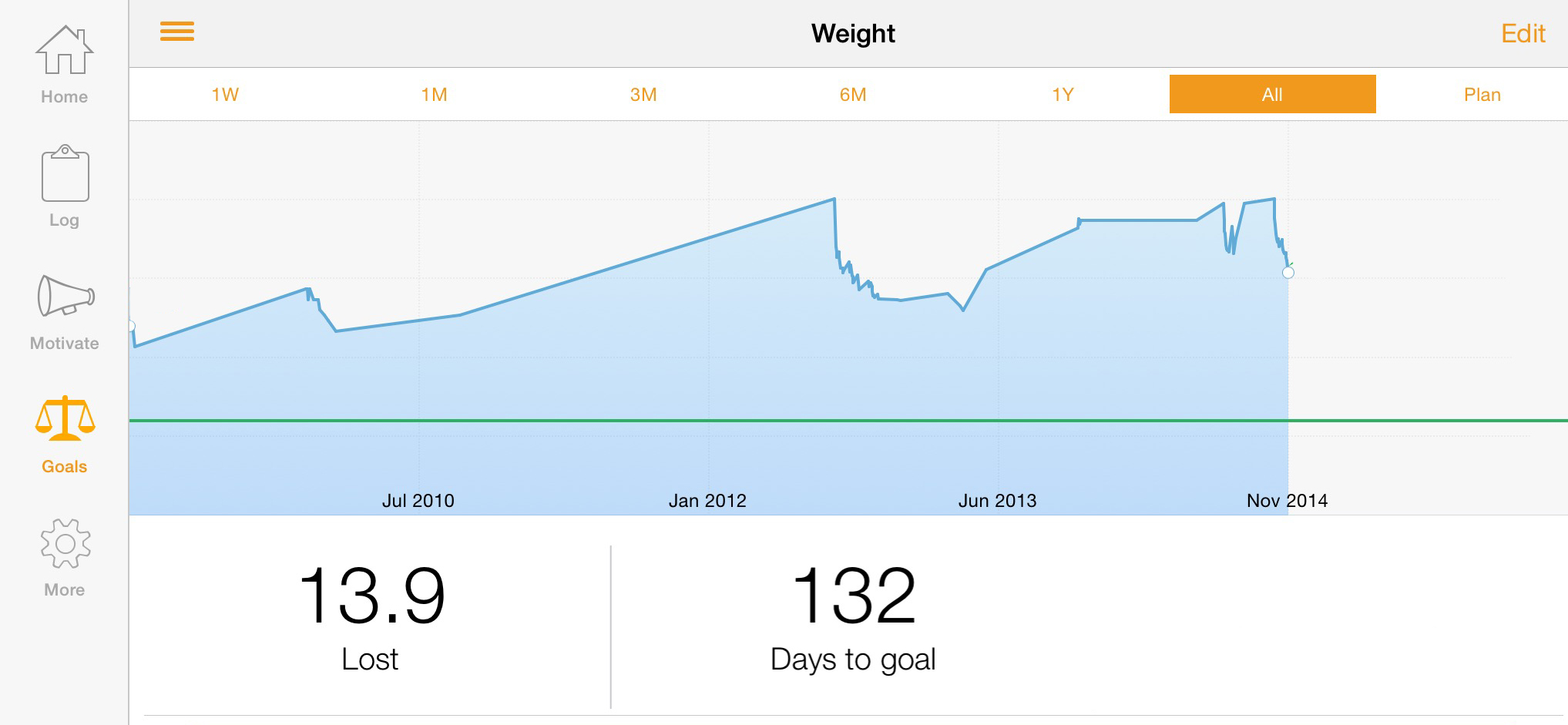
Those who know me know that I struggle with the common problem of weight gain.  Those of us that love food share this problem in Lose-itcommon. It is, to say the least, a struggle.  For more than five years I have been tracking, on and off, my food intake and my weight in a mobile App called Lose-it.  The specific numbers have been wiped from view to avoid further embarrassment. The chart clearly shows the upward climb when the cycle is Off and the downward decent when the cycle is On.   It is very clear, when you record your weight and understand your intake, you will lose weight.  When you ignore your weight and your intake, you will gain weight if you are predisposed to gain weight like I am. So what is the problem?  Why can’t I persist and maintain the On schedule. Well understanding what I now understand through the clarity of graphic intelligence, I think I can. I really do.

So how does this relate to business and why am I sharing this personal information with you?  Because the same thing that applies to weight loss applies to business.  Watching intake and outflow and managing your business will improve results. The issue is how do you view your business intelligence? This – business intelligence or BI – is a subject that is beginning to get some legs.  Oracle, IBM, SAP and Microsoft are working hard to ease these tools into existing software architecture.

Over the coming months we will be working with Microsoft BI tools and your SQL Server data to help you get a better view of your ins / outs and gains / losses.  Like the chart above, business charts and graphs reviewed regularly and systematically will help the decision making process towards success – whatever that looks like to you! Stay tuned!

Posted in Uncategorized.

Microsoft OneNote

I thought I had reviewed Microsoft OneNote before but it seems I have not. Shame on me! Microsoft OneNote is a quiet little powerhouse of an application. Think of it as an incredible personal assistant organizing every aspect of your life. Office 365 users have this application at your fingertips.

So what is it? It is an enormous file cabinet, the contents of which are safely synchronized to the cloud and accessible using your office desktop, home desktop, laptop, Windows or MAC, iPad or iPhone.

The file cabinet is filled with Notebooks containing colored folders, the tabs of which are displayed for quick access. Within the folders are pages, subpages and sub-subpages. Within a page can be a year’s worth of emails, contract documents or memos, links to web references, attached spreadsheet, a Visio diagram, screen-shots, pictures, recorded audio notes and even video clips.

It works with scanners, news readers, livescribe smartpens, Office Lens, OneNote Clipper, Feedly and more! Share a Notebook with employees, collaborators or partners. Mutually make modifications to folders or pages and OneNote will not only synchronize those changes but maintain a history of revisions as well.

Integrate Outlook with OneNote and you are able to link between a calendar item, like a meeting, to the notes you took in that meeting. Once the connection is made, synchronization between OneNote and Outlook allows you to flip back and forth between event and the notes for the event. A great use is to email OneNote pages directly from OneNote to participants of a meeting.

OneNote is one of those tools that is so powerful, most users will only use a tiny sliver. Let us know if you would like to really like to implement OneNote. At a minimum, take some time and watch some Youtube videos.

Posted in Uncategorized.

Can You Say Capacitive?

What is a stylus?  What is a capacitive stylus? Do we even need one?  Let’s ask  Steve Jobs.  Going back to 2007, Steve always thought we didn’t need a  stylus when we could use any one of our ten fingers.  Why? He thought we would  lose them (we do),  he thought it wasn’t natural (it isn’t), he thought we  should use the best pointing device in the world – our finger (he was right).  However, there are many applications that just feel better with a  stylus that feels like  a pen, a pencil or a brush.  I have a number of styli (plural for stylus).

But I set out to create my own unique stylus. I wanted something heartier, heavier and comfortable to hold. Pictured here is  the utensil I created from an old tree I found in the back yard, my lathe and  an old metal stylus I had laying around.  Along the way, I discovered the  science behind a capacitive stylus required for capacitive sensing screens like  iPad’s and iPhones. Creating a capacitive stylus requires that  the tip of the stylus transfer the static electricity from a person’s hand to  the sensors on the screen. In essence, it needs to conduct electricity. So how  did my primitive custom stylus work out?  Not so hot.  If my fingers  were close to the metal stylus tip, it worked great. If I held this device on  its end away from the tip, it did not work at all.  Solution?  Wrap  the entire wooden object with aluminum foil.  That worked great — until the aluminum foil tore or just fell off in which case I was back to  square one. You see, wood is not a good conductor of electricity. Who knew that was important!

So I am heading  back to the drawing board searching for a wood like product that can be molded  but also conducts electricity.  Stay tuned!

Posted in Uncategorized.